
Operational only
Account, role and schedule messages. No marketing or promotional texts are ever sent.
Administrator-attested
A church administrator must tick a consent attestation before a mobile number can be saved.
Never required
Consent to receive texts is never a condition of using the product.
What the messaging program is
ChurchSecurityPlanner is software from Conversion Catalyst LLC used by churches to run their safety and security ministry — volunteer scheduling, shift coordination, incident reporting, and team communication.
Where a church enables it, the platform sends operational text messages to that church’s own staff and volunteers: an invitation to join their team, sign-in credentials, and notifications about their role and schedule.
We do not send marketing or promotional messages, and we do not sell, rent, or share mobile numbers with third parties for their own marketing. Numbers are used only to deliver the operational messages described here.
Who receives messages, and why
Recipients are staff and volunteers of a specific church, invited by an administrator of that same church. There is no public sign-up for text messages and no list a member of the public can be added to.
A person receives a message only because someone at their own organization added them to a safety team and needs to reach them about it.
- Invitation to join the church’s team, with sign-in instructions.
- Schedule and shift notifications relating to the volunteer’s own assignments.
- Account messages such as credentials for first sign-in.
How consent is obtained
Consent is collected in the application by the church administrator who is inviting the person, at the moment the mobile number is entered. The administrator is the person with the direct relationship to the volunteer.
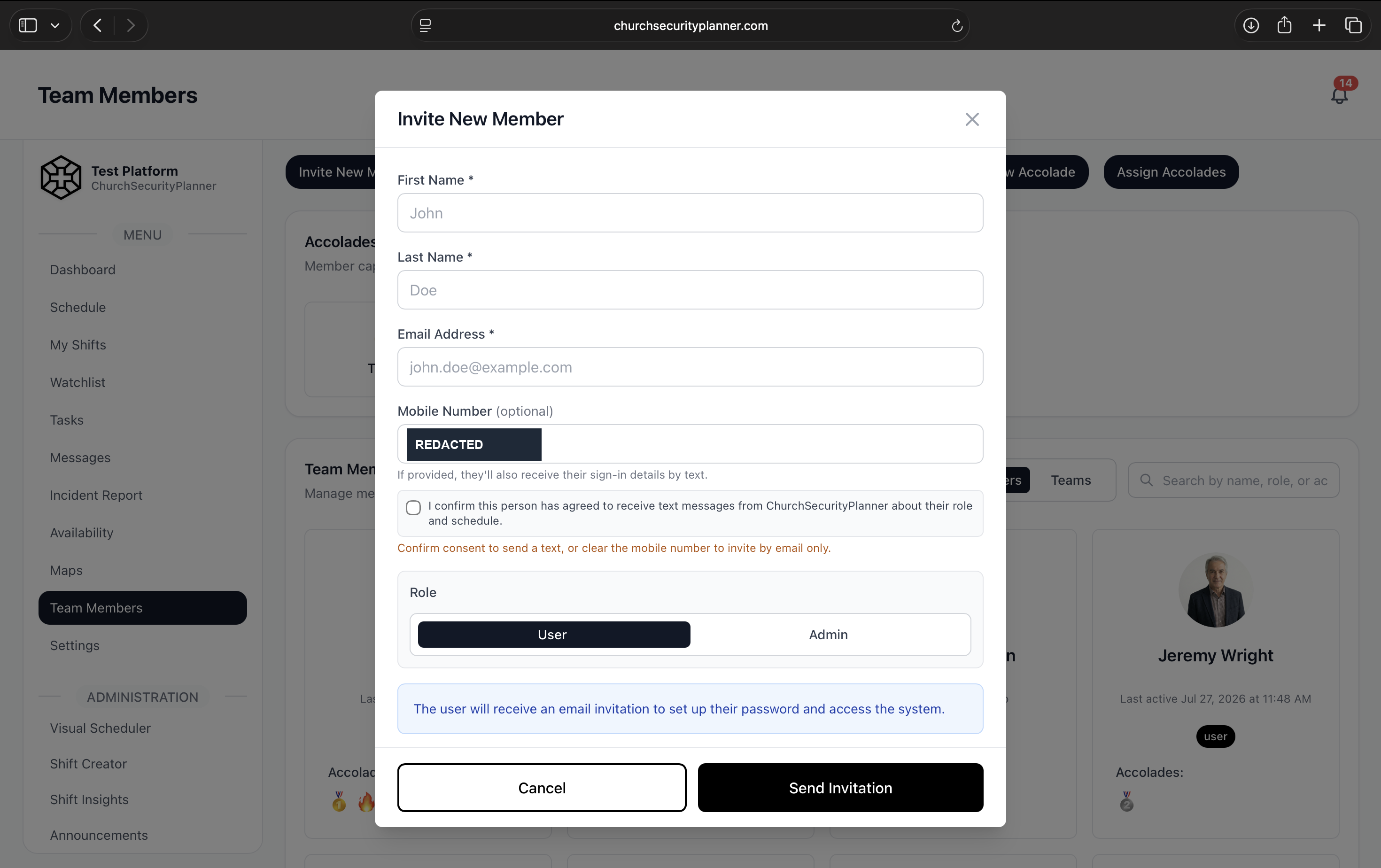
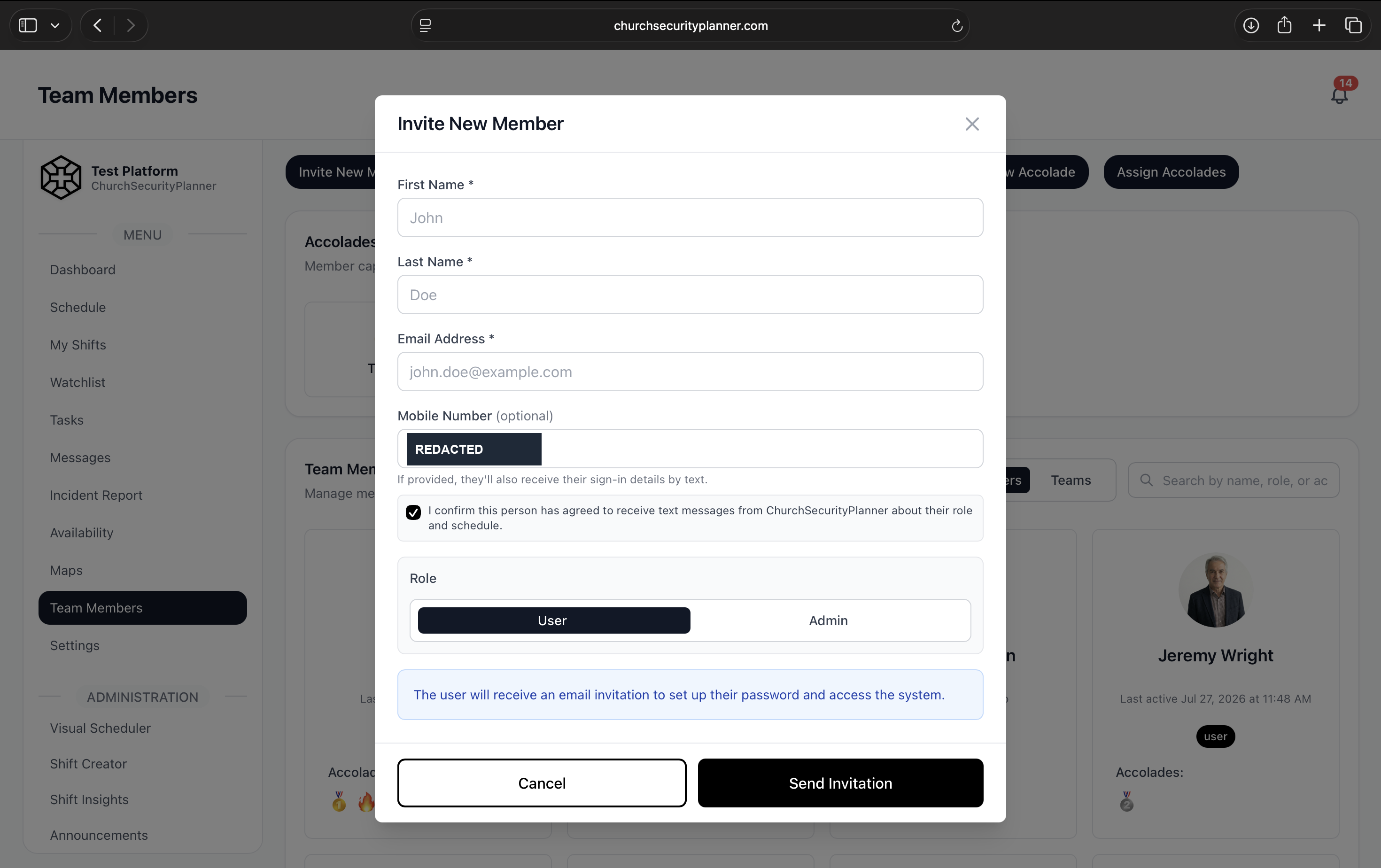
The mobile number field is accompanied by a consent checkbox. The administrator must tick it to confirm that the person has already agreed to receive text messages. Until it is ticked, the invitation cannot be sent with a mobile number — the form blocks and shows a warning.
Ticking the box writes an audited row to an internal consent ledger recording who attested, for which person, at what time, and against which exact version of the wording. A consent record that cannot say what the person agreed to is a timestamp, not evidence.
Consent to receive text messages is never a condition of using the Service. A church can invite and manage volunteers without providing any mobile number at all.
The exact wording an administrator must agree to
This is the attestation shown next to the consent checkbox, reproduced here verbatim as text:
I confirm this person has agreed to receive text messages from ChurchSecurityPlanner about their role and schedule.
The consent screen, and what happens without consent
Both images below are the live invitation form at /admin/team-members, reachable only by a signed-in church administrator. The browser address bar is visible in each, showing churchsecurityplanner.com.
They are the same screen in two states. In the first, a mobile number has been entered and the consent box is NOT ticked: the form refuses, and states in red that the administrator must either confirm consent or clear the number and invite by email instead. In the second, the box is ticked and the form proceeds. Consent is not a disclosure the administrator can scroll past — it is a condition of storing the number at all.
The mobile number is redacted in both. It is a real, working number and this page is public and indexable; the digits prove nothing, while the field, the warning and the attestation all remain fully legible. Nothing else in either image has been altered.
The message that is sent
This is the invitation message registered with this campaign, reproduced exactly as the application stores it, including the placeholders filled in at send time:
ChurchSecurityPlanner: You've been invited to join {CHURCH}. Sign in at churchsecurityplanner.com with {EMAIL} and temp password {TEMP_PASSWORD}. Reply STOP to opt out, HELP for help.
The same message with the placeholders filled in
Substituting illustrative values — {CHURCH} = First Example Church, {EMAIL} = john.doe@example.com, {TEMP_PASSWORD} = a generated eight-character password — a recipient receives:
ChurchSecurityPlanner: You've been invited to join First Example Church. Sign in at churchsecurityplanner.com with john.doe@example.com and temp password Xk4p9RtQ. Reply STOP to opt out, HELP for help.
Opting out, and getting help
Every message identifies ChurchSecurityPlanner as the sender and carries opt-out instructions.
- Reply STOP to any message to stop receiving text messages. The opt-out is honoured immediately and confirmed.
- Reply HELP to any message for assistance, or email info@churchsecurityplanner.com.
- Message and data rates may apply. Message frequency varies with the recipient’s own schedule and their church’s activity.
Opting out of text messages does not affect a person’s account. They keep full access to the application and continue to receive the same information in the app and by email.
The exact replies to STOP and HELP
These are the auto-replies registered with this campaign, reproduced verbatim. Replying HELP returns:
- ChurchSecurityPlanner: Account and schedule messages for your church security team. Support: info@churchsecurityplanner.com. Reply STOP to opt out.
- ChurchSecurityPlanner: You will not receive further text messages. Reply START to resume.
The first is the reply to HELP; the second confirms an opt-out after STOP. START is honoured as a genuine resubscribe, not a message into a system that will ignore it — the opt-out record is most-recent-event-wins, so a person who stops and later starts again receives messages again.
Policies
Our policies are published in full and readable without JavaScript. Section 9 of the Privacy Policy covers text messaging specifically:
Contact
Conversion Catalyst LLC d/b/a ChurchSecurityPlanner
4546 Chapman Hwy #3025 Knoxville, TN 37920
Email: info@churchsecurityplanner.com